A Redesign Audit of the “If you’re getting other benefits” Screen
In this short UX audit, I examine a key decision screen in the Universal Credit (UC) online service: the page that appears after a user confirms they are making a claim for themselves (step 3 in the process flow). It warns applicants that their existing benefits will stop if they apply for UC, even if their application is unsuccessful.
Because this is a legally sensitive screen, poor phrasing or layout can directly lead to misunderstanding and emotional stress — especially for users with low literacy or confidence.
Research with these user groups — conducted during my doctoral work shows that abstract phrasing, dense layouts, and checkbox-based confirmations (as seen in the current Beta screen) can reduce comprehension — or worse, lead to abandonment or unintentional consent, especially when irreversible outcomes are involved.
As of 2021, 20-50% of UK adults had limited digital skills, and around 18% in England had low literacy levels. These users are not edge cases, they are part of the mainstream public
Importantly, the issue isn’t user failure — it’s design that doesn’t align with how all users think, read, or move through tasks.
This mini audit highlights a section screen that could unintentionally block access for many users offers small, actionable testable ideas to support a more inclusive user experience.
Method
- Simulated the experience of a first-time applicant with low literacy and digital confidence, based on fieldwork with functionally excluded users navigating mobile services
- Applied cognitive walkthroughs and heuristic analysis, using GDS principles and inclusive design guidelines for users with low literacy and limited digital skills.
- Annotated comparison between the original screen and a redesigned mockup based on inclusive design patterns
Key Issues
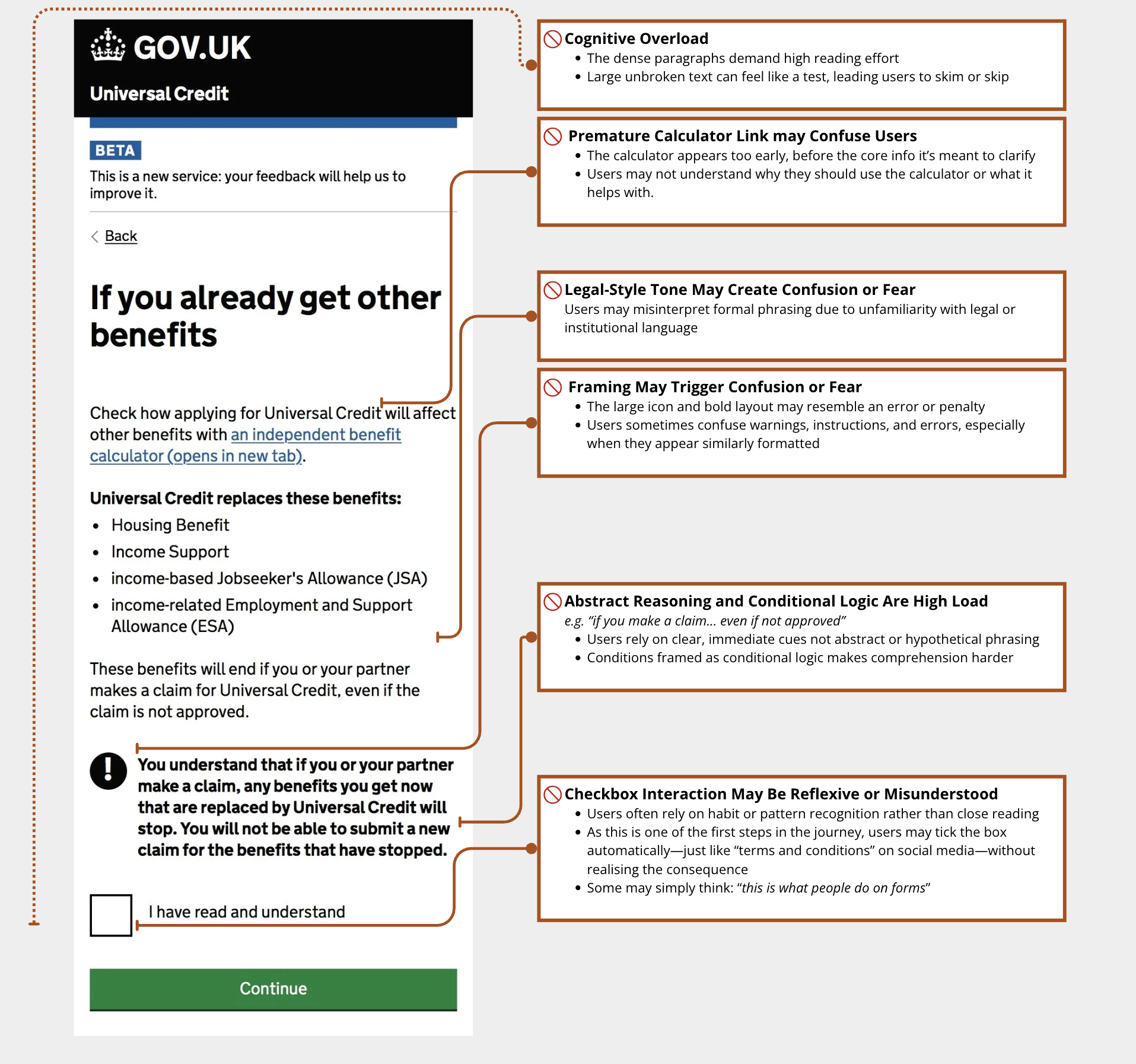
The screen below shows the current Universal Credit “claim conditions” screen (step 3 in the process flow). Each detail may seem minor in isolation but together, they create a disorienting and exclusionary experience.
Critically, many users may treat the checkbox confirmation like social media terms and tick without truly understanding.
The original design assumes a literate, contract-style interaction, presenting irreversible outcomes as legal statements, followed by a passive checkbox
Fig 1: Annoted Friction Points on the Original Universal Credit Screen (Beta Version)
The annotations below highlight common friction points for users with low literacy or digital skills that could result in misunderstanding or premature consent.
The flow also reverses how users typically process high-stakes information — showing consequences before rules, and burying the list of affected benefits after the confirmation
Design Suggestions
The revised version supports reflection, not reflex.It mirrors how users naturally reason through high-stakes decisions:
What’s happening? → What does it mean for me? → What can I do?
Aongside adjustments to language, tone, help, and confirmation, this ensures:
Consent becomes an intentional step — not a reflex.
These are small, low-risk design changes, annotated below. They are in line with GDS principles and based on patterns that, in previous fieldwork, significantly improved task completion and reduced error rates. They can be tested through A/B trials or inclusive usability studies.
Fig 2: Redesigned Mockup (proposed improvements)
The annotated redesign illustrates how each change targets a known friction point for users with low literacy/digital skills.
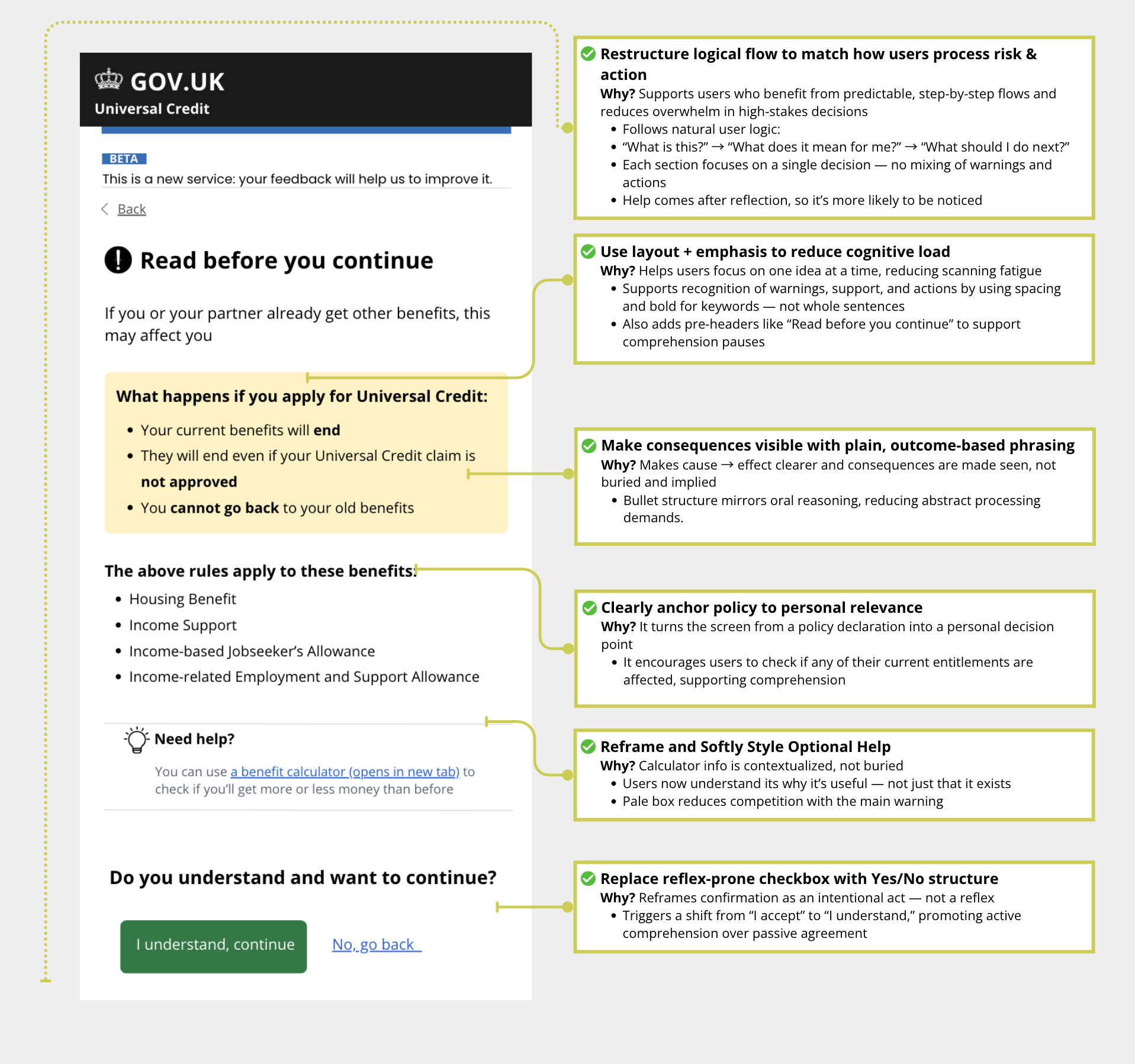
These designs were developed while considering GDS principles and are starting points for other service teams that could be adapted further to tackle similar inclusion goals.
Why This Matters
In high-stakes moments, clear design isn’t just helpful — it’s what makes informed consentpossible.
Even small shifts in flow or language can build confidence, reduce abandonment, and support users who might otherwise be left behind.