HIGH-LEVEL PROJECT SUMMARY
This project aimed to reduce mobile banking friction for low-literate users by redesigning with diverse cognitive styles in mind
Focus: Inclusive mobile banking redesign
Role: Lead UX Researcher (End-to-end: Research, Journey Mapping & Redesign Recommendations)
Scope: Redesigning mobile money transfer flow in a mobile banking app to match user mental models. Tested both original and redesigned flows with real users – 50 people in total
Methods: Mixed – think-aloud testing, keystroke recording, surveys (with adaptations for ethical implementation)
Tools: Figma (low-fi prototype, personas, user journey maps), Protopie (interactive prototype), IBM SPSS + Excel (task metrics), Microsoft Forms (UX surveys) & AirTable (Repository + verbal feedback).
Study Duration: 3 years overall | Impact testing on 2 interface versions using orginal app vs redesigned UI
Outcome: Statistically significant improvements: Reduced friction, improved task success, better user confidence
PROBLEM & CONTEXT
Problem Statement:
- Low-literate users often have difficulties in completing mobile transfers due to unclear fields, poor sequencing, and overwhelming layouts.
- Most apps ignore literacy-related gaps like reading comprehension and abstraction skills.
- In early testing, only 25% of low-literate users completed a basic transfer, vs 100% of literate users.
Why This Matters
Financial exclusion affects 1.4 billion adults globally (Global Findex 2021), with many owning smartphones but unable to use digital banking effectively. This isn’t just a design problem; it’s a barrier to economic participation.
When mobile banking interfaces exclude low-literate users, they’re cut off from savings, credit, and secure transactions that could improve their lives.
By redesigning with cognitive accessibility in mind, we can unlock financial services for millions who currently rely on expensive, risky alternatives.
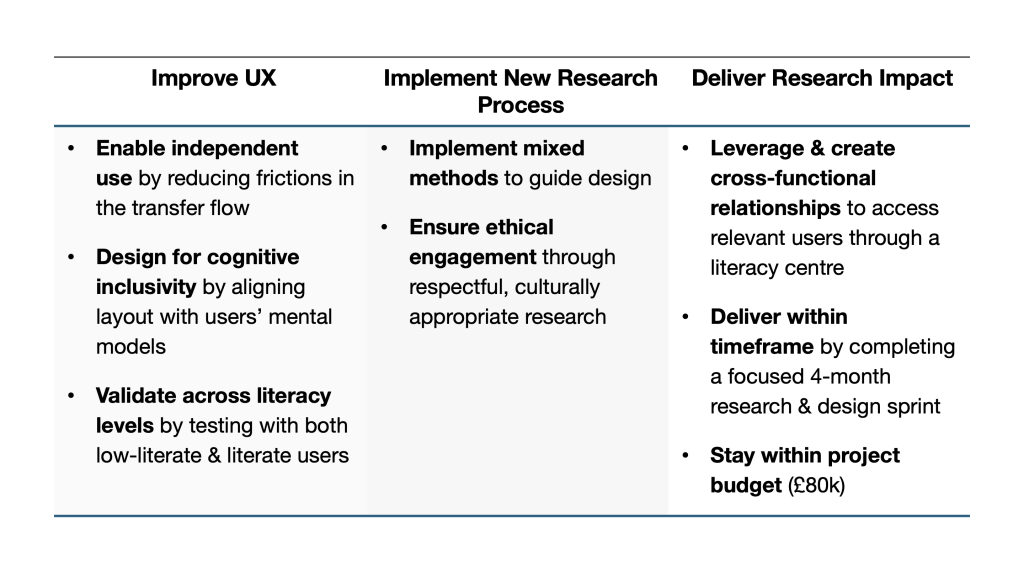
Project Goals
UX RESEARCH METHODS
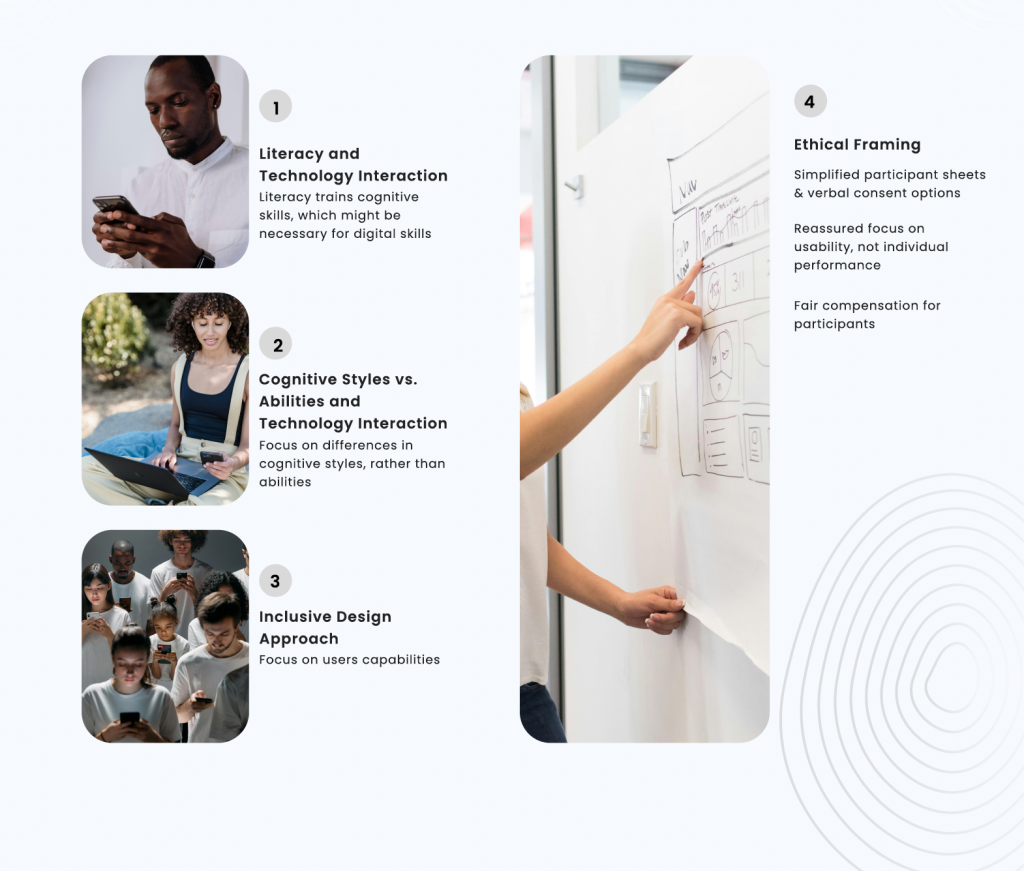
Desk Research & Considerations
Team Structure:
Product Level:
- 3 Project Supervisors
- 1 UX Researcher
- Lead UX Researcher
- 1 UX Designer
Project Level:
- NGO (Adult Literacy Centre)
- Literacy Centre Staff and Students
- Project Funders (Commonwealth – FCDO, UK)
Design Cycle
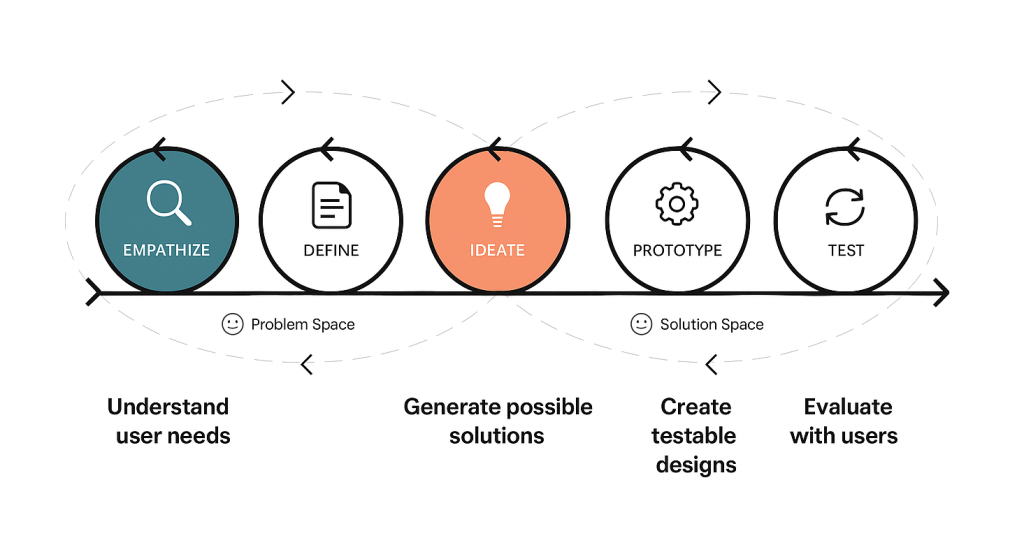
My UX Research Process
My Responsibilities: Led all phases of research, analysis, strategy and testing
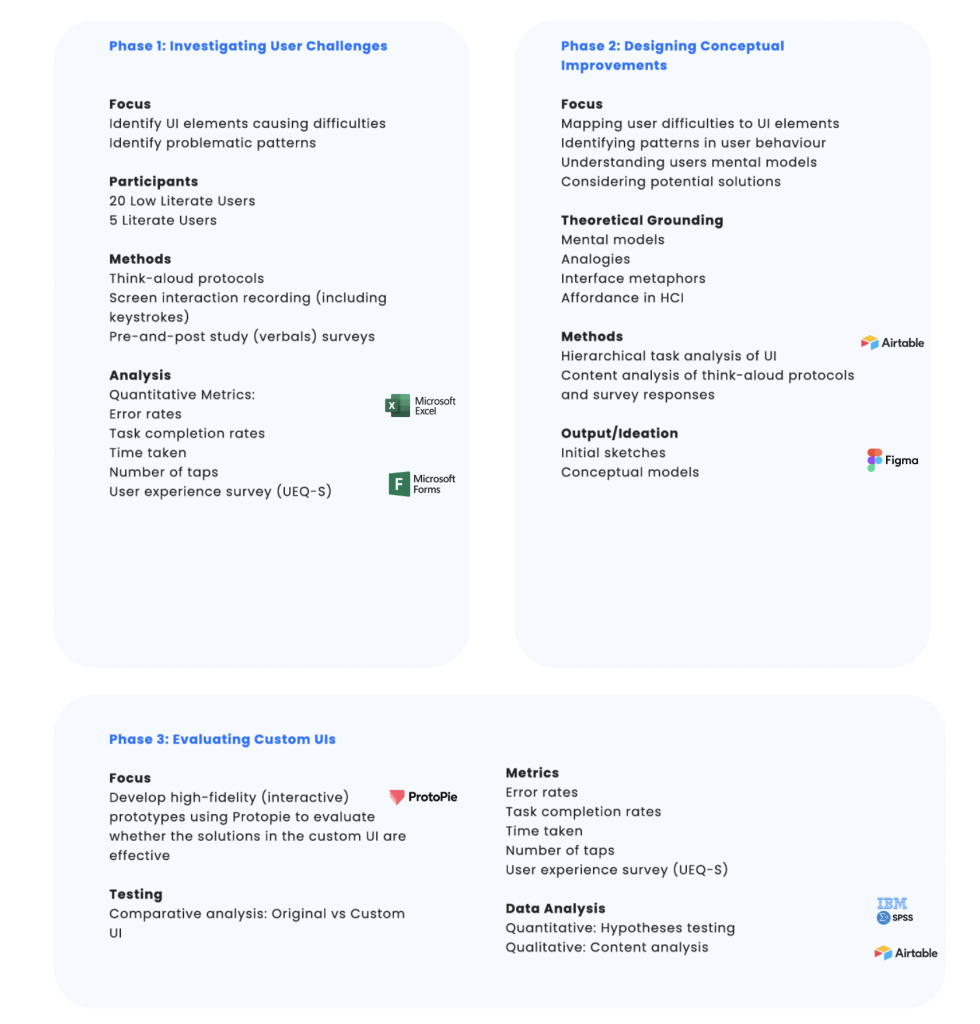
Research Methods
Persona Creation:
- Recruited 5 low literate users vs 5 literate users
- 40 minutes remote user interview sessions
- Aim: identify experiences, smartphone behaviours, pain points & goals
- Created user personas in Miro to represent key differences

User Testing
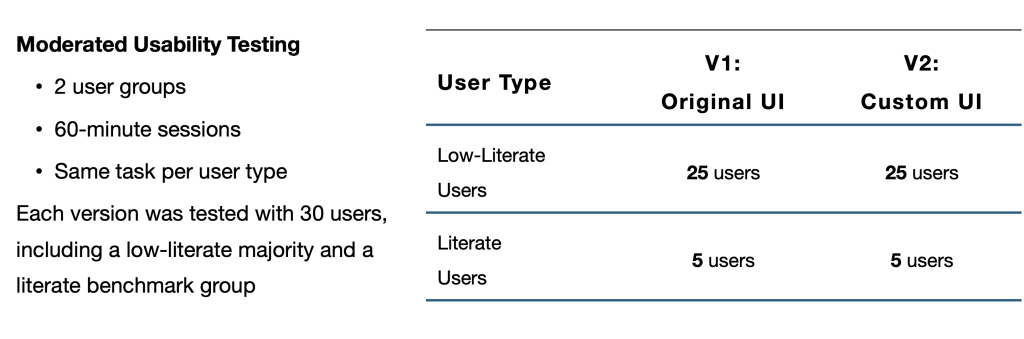
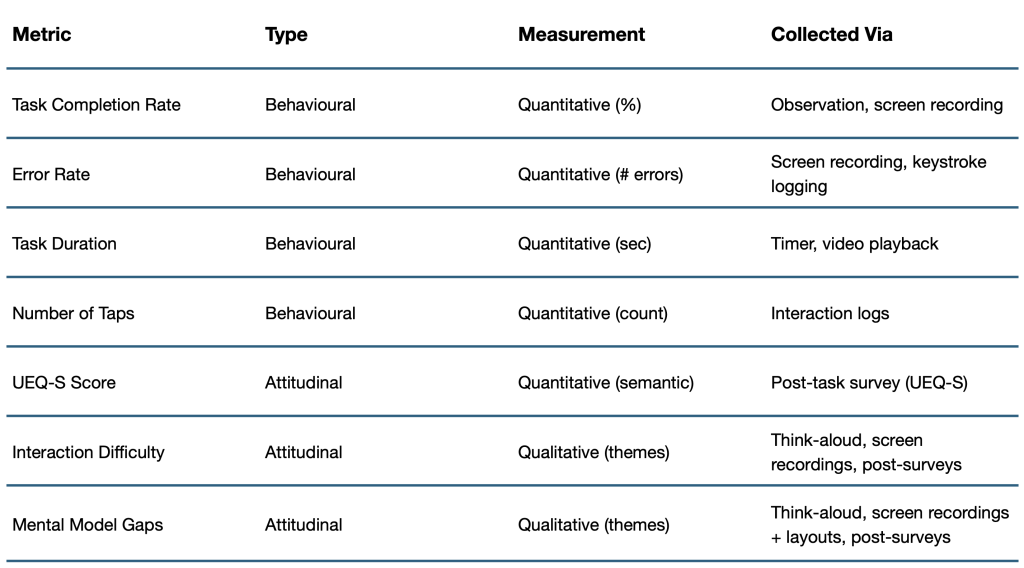
Metrics + Testing Structure
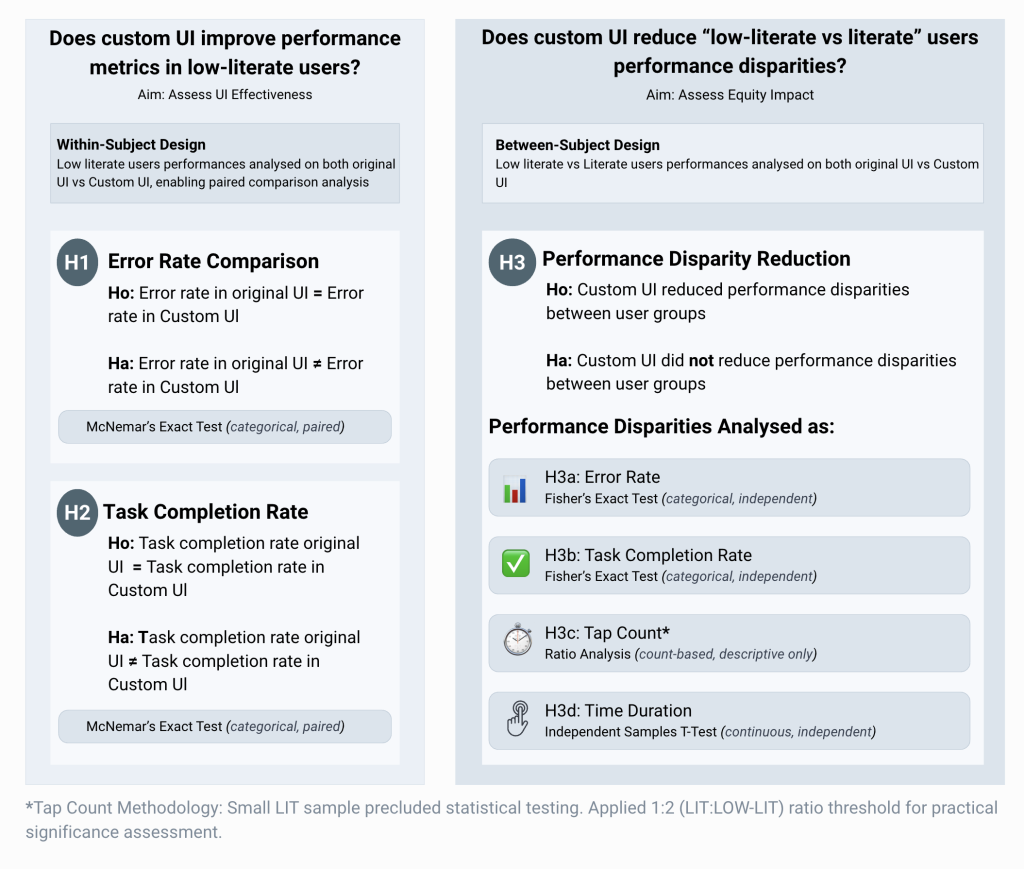
Quantitative Research Analysis Process
Experimental: Hypothesis Design
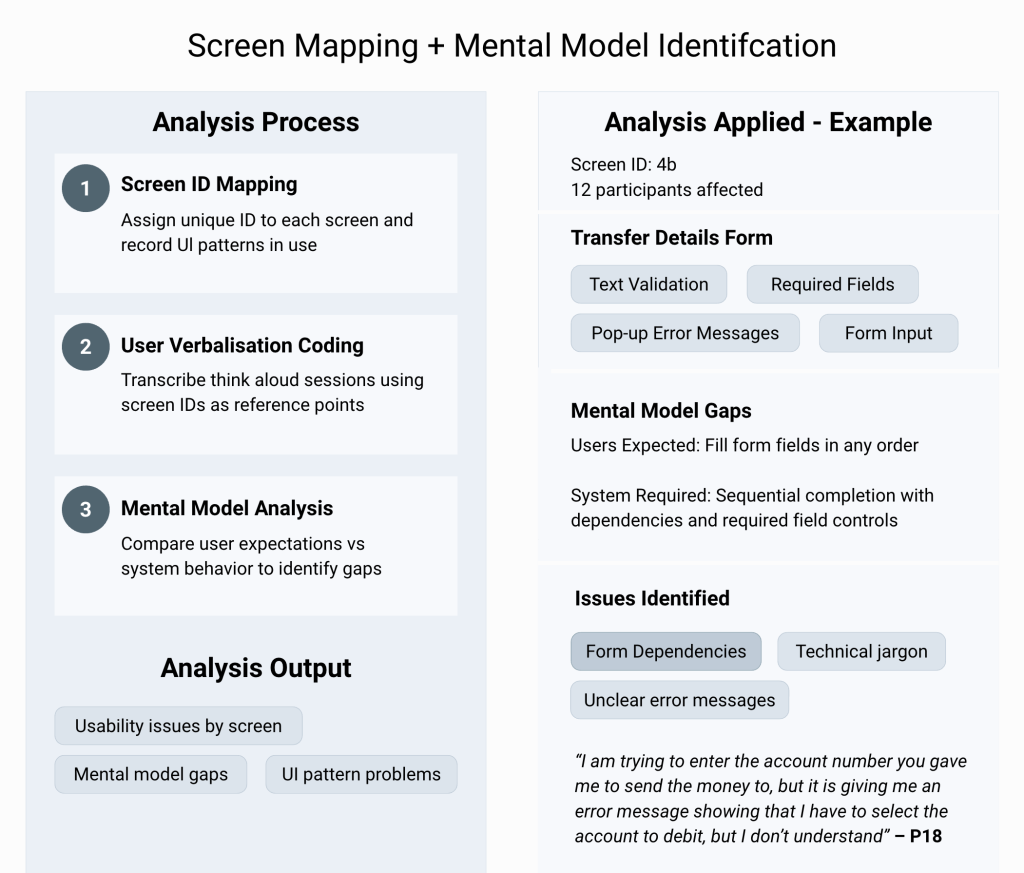
Qualitative Research Analysis Process
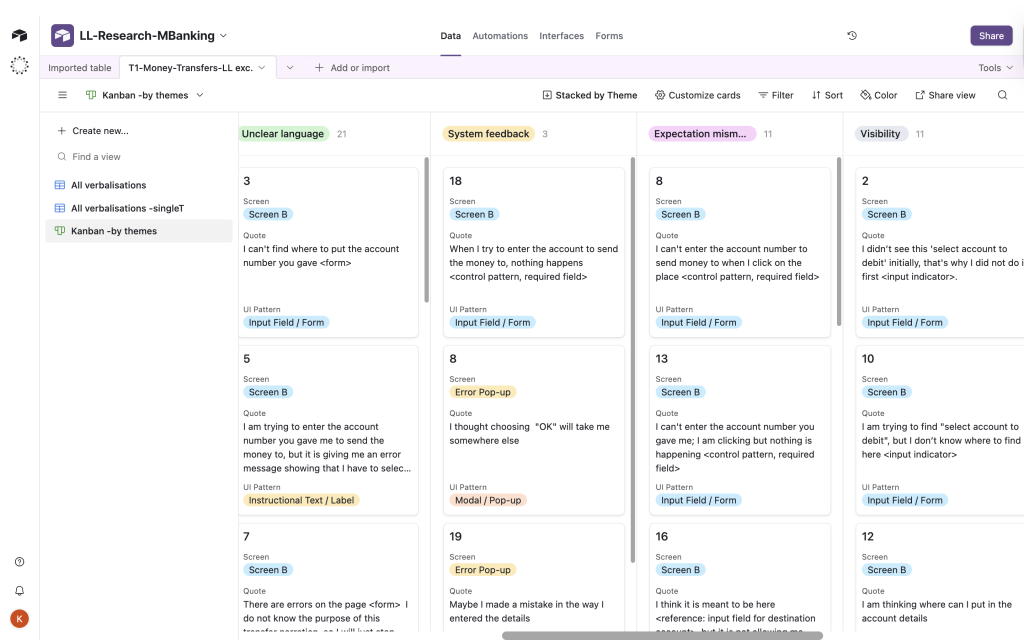
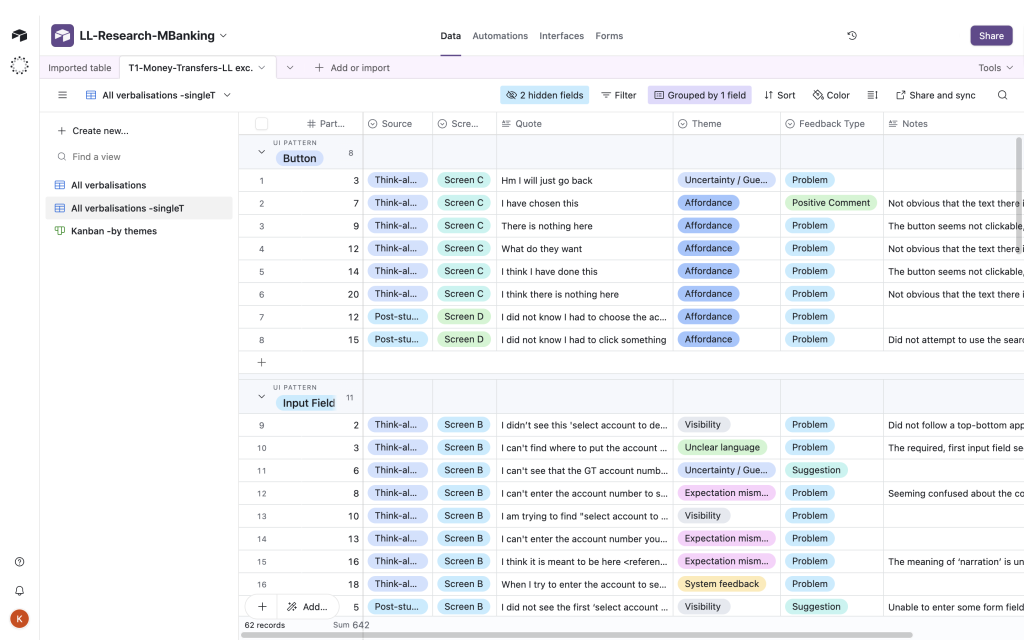
AIRTABLE UXR REPOSITORY
Coding and organising user verbalisation quotes across Themes, Screens, UI Patterns and Sentiment.
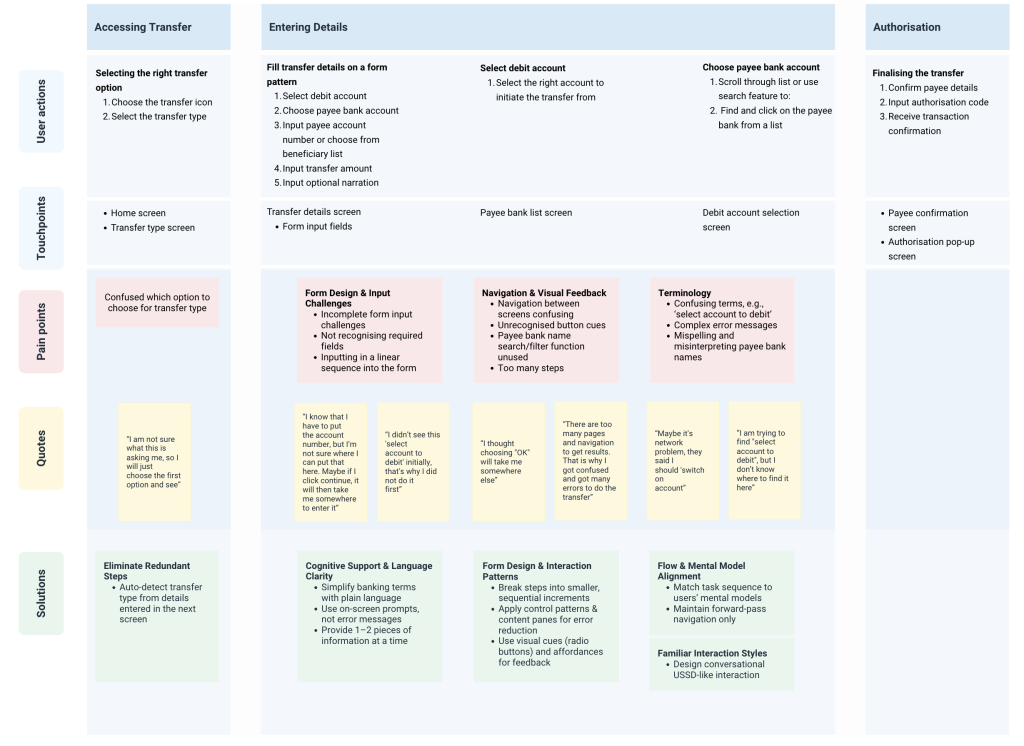
USER JOURNEY MAP
User Journey Maps were developed using real-time observations, task completions, and verbal feedback gathered during moderated usability sessions with users. They were further informed by pre-study interviews and task-based walkthroughs across both the initial and custom UI flows.
DESIGN SOLUTIONS
Prototypes
I created the design solutions grounded in user feedback and handed them off to the UX Designer, who then developed them into interactive prototypes for my testing phase.
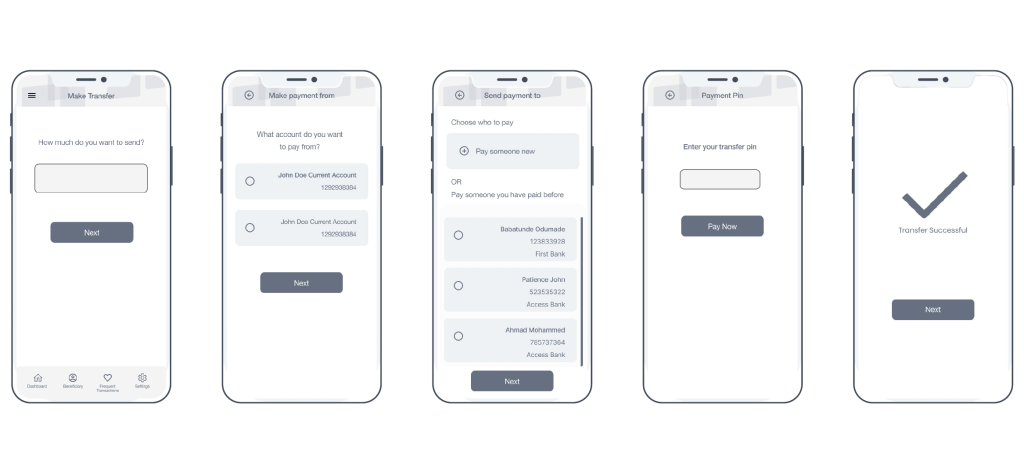
Before & After: Simplifying Money Transfers
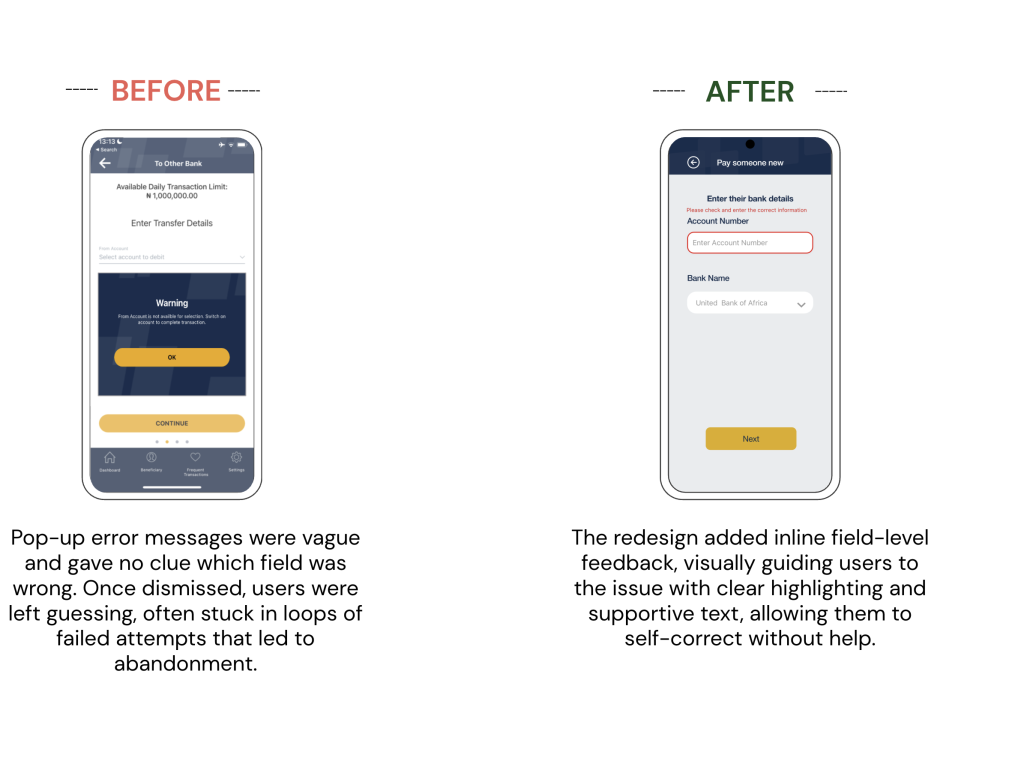
These examples show how user feedback shaped key interface improvements; not just to reduce errors, but to support user confidence and clarity.
Navigation Fix


Interaction Level Fix
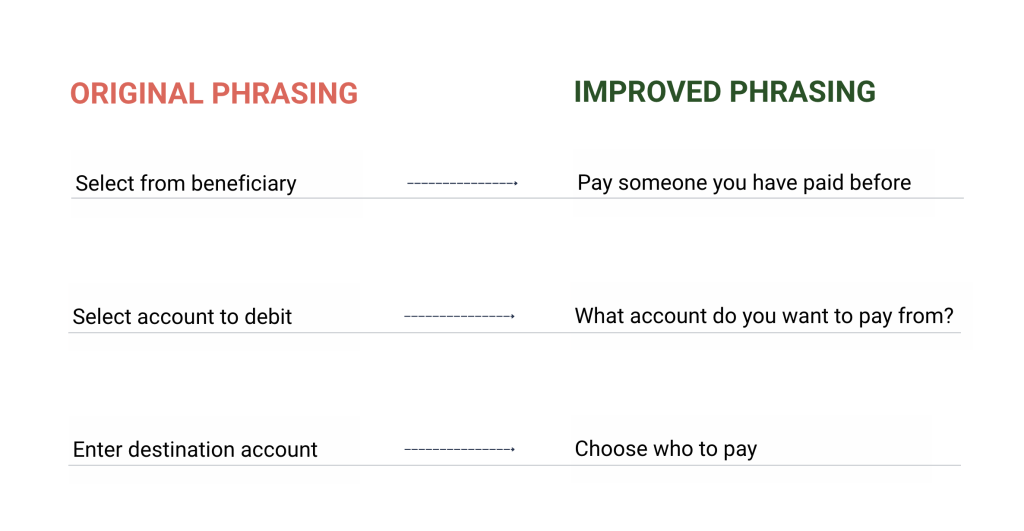
Microcopy Refinements that Improved Clarity
These changes were implemented across different screens but consistently made system language feel more conversational and user-oriented.
TESTING RESULTS
Usability Outcomes
- Users appreciated the one-task-per-screen flow, no longer feeling lost or overwhelmed.
- In the original UI, navigating between multiple screens before returning to the form created a loop-like confusion for users.
- Users gained confidence in completing input fields, even recognising and correcting their own mistakes.
- Technical banking terms like “account to debit” and “beneficiary” caused confusion and hesitation in original UI.
- Users rarely needed help using the custom UI, as clearer buttons and screen cues made the interface feel intuitive.
- Literate users performed well across both UIs, but low-literate users especially benefited from the simplified flow.
- Despite adding screens, the custom UI felt “lighter” because it matched how users think and work through tasks.
73%
decrease in help requests
+75%
improvement in success rate; completion rate improved from 25% to 100% (p = 0.000)
↓from 3:1 to 1:1
time ratio (LOW-LIT : LIT) in original UI vs custom UI (p = 0.439)
↓from 2:1 to 1:1
taps ratio (LOW-LIT : LIT) in original UI vs custom UI
User Experience (UEQ-S) Survey Outcomes
The UEQ-S measures perceived UX across six dimensions and benchmarks results against a database of 246 existing products. The redesign moved users from frustration to satisfaction.
As shown in the results below, the redesign didn’t just work better, it felt better to use.

IMPACT
- Empowered Independent Task Completion: 73% decrease in help requests, with completion rates improving from 25% to 100%.
- Eliminated User Frustration: Reduced time-to-completion from 3:1 to 1:1 ratio and improved UX satisfaction from “Below Average” to “Good/Excellent.”
- Created Reusable Design Principles: Developed evidence-based framework for inclusive mobile design, with methodology submitted for academic publication.
- Proved Accessible Design Benefits All Users: Quantified that inclusive design improves outcomes across literacy levels, not just target demographics.
REFLECTIONS
- Design isn’t just visual, it’s cognitive. What confused users wasn’t only clutter, but a conceptual mismatch. I learned to align interactions with mental models not system architecture.
- “Simple” can still exclude. Reducing screens didn’t help; it removed guidance. I discovered that real simplicity meant designing flows that users could follow without fear.
- Familiarity beats novelty. USSD-style flows outperformed more complex layouts. I learned that recognisability often trumps innovation in inclusive/accessible design.
- Research is translation. I wasn’t just collecting feedback, I was interpreting mental models and translating system logic into human logic.
